 Fuze
Flow
Build node-based workflows to chain generations, references and tools, then save and reuse them.Crea workflows basados en nodos para encadenar generaciones, referencias y herramientas, y guárdalos para reutilizarlos.
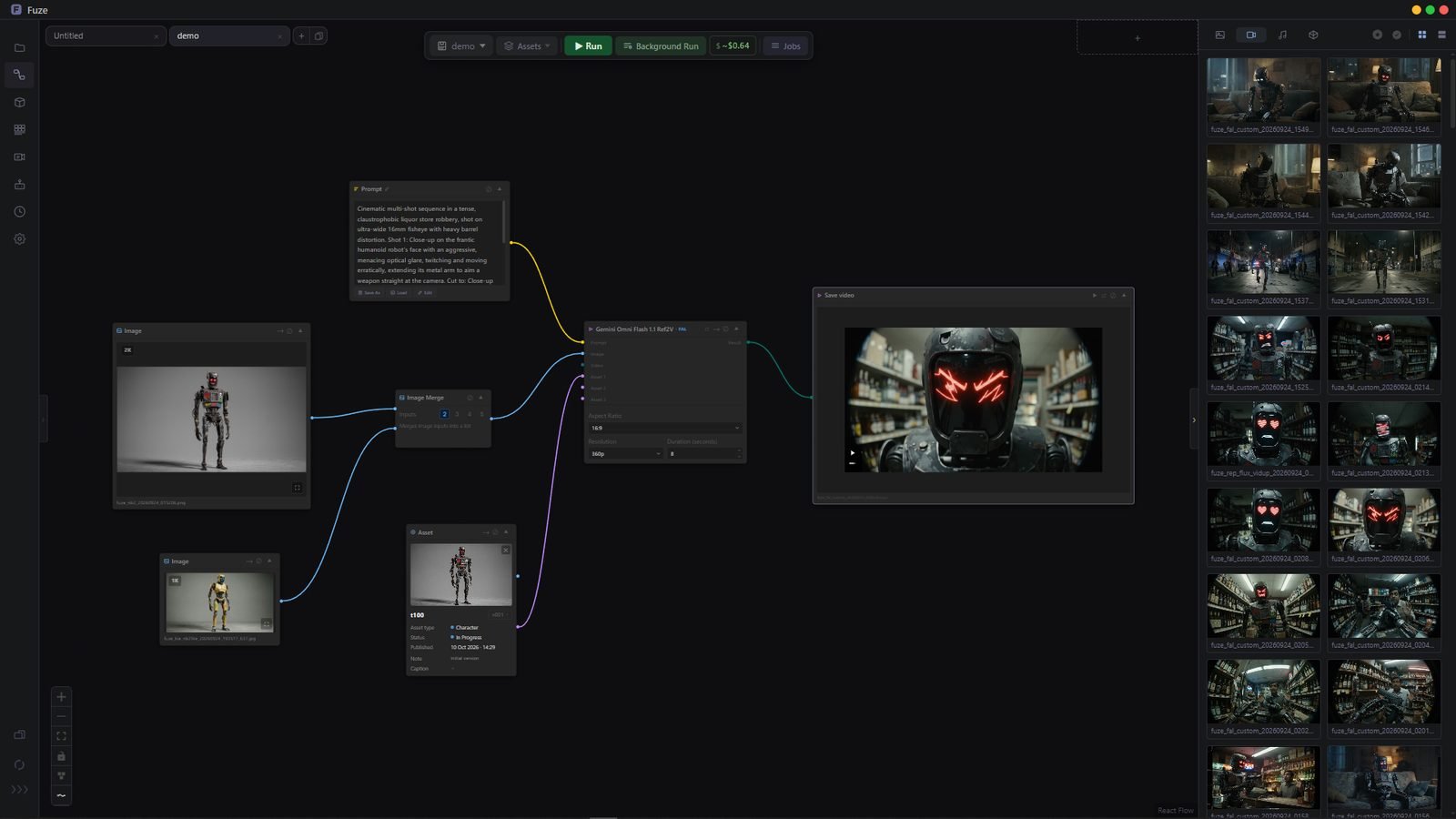
- Add nodes. Right-click or press
Tabon the canvas. Dragging from a connector opens a list filtered to nodes that can plug in. An empty canvas offers a prompt box and ready-made templates to start.Añade nodos. Clic derecho oTaben el lienzo. Al arrastrar desde un conector se abre una lista filtrada con los nodos compatibles. Un lienzo vacío ofrece una caja de prompt y plantillas para empezar. - Connect. Connections are typed (image, video, text...). Dropping an output onto another output of the same type creates a Merge node, and dropping a node over a connection inserts it in the middle.Conecta. Las conexiones son tipadas (imagen, vídeo, texto...). Soltar una salida sobre otra salida del mismo tipo crea un nodo Merge, y soltar un nodo sobre una conexión lo inserta en medio.
- Generate. Fal, Kie, Replicate, Google and Cloudflare models appear once their key is set in Settings > Generation APIs. Run the whole flow (
Ctrl+Enter) or only from one node. Independent branches run in parallel and a jobs panel shows the queue.Genera. Los modelos de Fal, Kie, Replicate, Google y Cloudflare aparecen cuando su clave está en Settings > Generation APIs. Ejecuta todo el flow (Ctrl+Enter) o solo desde un nodo. Las ramas independientes se ejecutan en paralelo y un panel de trabajos muestra la cola. - Keep control of cost. A cost badge estimates each run and can suggest a cheaper provider for the same model.Controla el coste. Un indicador estima cada ejecución y puede sugerir un proveedor más barato para el mismo modelo.
- Reuse. Save and open flows in tabs (
Ctrl+S,Ctrl+O), start from Templates, add your own Custom Nodes and load assets from the registry. Drag images in from the Manager or your computer, and drop a PNG withAltto load the workflow stored inside it.Reutiliza. Guarda y abre flows en pestañas (Ctrl+S,Ctrl+O), empieza desde Plantillas, añade tus Custom Nodes y carga assets del registro. Arrastra imágenes desde el Manager o tu ordenador, y suelta un PNG conAltpara cargar el workflow que lleva dentro. - Run ComfyUI workflows. The ComfyUI node runs a workflow exported with Export (API) on the ComfyUI of your own computer, with an image input per Load Image node and a text input per prompt. It reads a Save Image or Save Video node, so the output is an image or a video. To keep a few settings in sight instead of inside the Settings list, start the title of that node in ComfyUI with
[Fuze](for example[Fuze] Duration), export the workflow again and choose it in the node: those settings appear at the top. You can also pin or unpin any setting with the pin icon next to it. Requires Indie or Studio.Ejecuta workflows de ComfyUI. El nodo ComfyUI ejecuta un workflow exportado con Export (API) en el ComfyUI de tu propio ordenador, con una entrada de imagen por cada nodo Load Image y una entrada de texto por cada prompt. Lee un nodo Save Image o Save Video, así que la salida es una imagen o un vídeo. Para tener a la vista unos pocos ajustes en lugar de dentro de la lista Settings, empieza el título de ese nodo en ComfyUI con[Fuze](por ejemplo[Fuze] Duration), exporta de nuevo el workflow y elígelo en el nodo: esos ajustes aparecen arriba. También puedes fijar o soltar cualquier ajuste con el icono de chincheta que tiene al lado. Requiere Indie o Studio. - Where it is saved. Workflows are saved inside your project, in
_workflowsand in a folder with your name, so they travel with the project and do not mix with other artists. You can open someone else's workflow from the user list in the Open window, but Save writes your own copy. Workflows saved by older versions of Fuze show up there as Old folder and Loose in project (deprecated), and can be moved to your folder. A Viewer can open workflows but not save them.Dónde se guarda. Los workflows se guardan dentro de tu proyecto, en_workflowsy en una carpeta con tu nombre, así que viajan con el proyecto y no se mezclan con los de otros artistas. Puedes abrir el workflow de otra persona desde la lista de usuarios de la ventana Open, pero Save escribe tu propia copia. Los workflows guardados por versiones antiguas de Fuze salen ahí como Old folder y Loose in project (obsoletos), y se pueden mover a tu carpeta. Un Viewer puede abrir workflows pero no guardarlos.