 Fuze
Fuze2Comfy Studio
Run your own ComfyUI workflows from a Flow node, on the ComfyUI of your computer, and keep those workflows as assets. It works the other way round from FuzeBridge: FuzeBridge sends results from ComfyUI to Fuze, while Fuze2Comfy sends images and text from Fuze to ComfyUI.Ejecuta tus propios workflows de ComfyUI desde un nodo de Flow, en el ComfyUI de tu ordenador, y guárdalos como assets. Funciona al revés que FuzeBridge: FuzeBridge envía los resultados de ComfyUI a Fuze, mientras que Fuze2Comfy envía imágenes y texto de Fuze a ComfyUI.
Studio licenseLicencia Studio
Fuze2Comfy is a Studio feature. The ComfyUI node in Flow requires a Studio license.Fuze2Comfy es una función de la licencia Studio. El nodo ComfyUI de Flow requiere una licencia Studio.
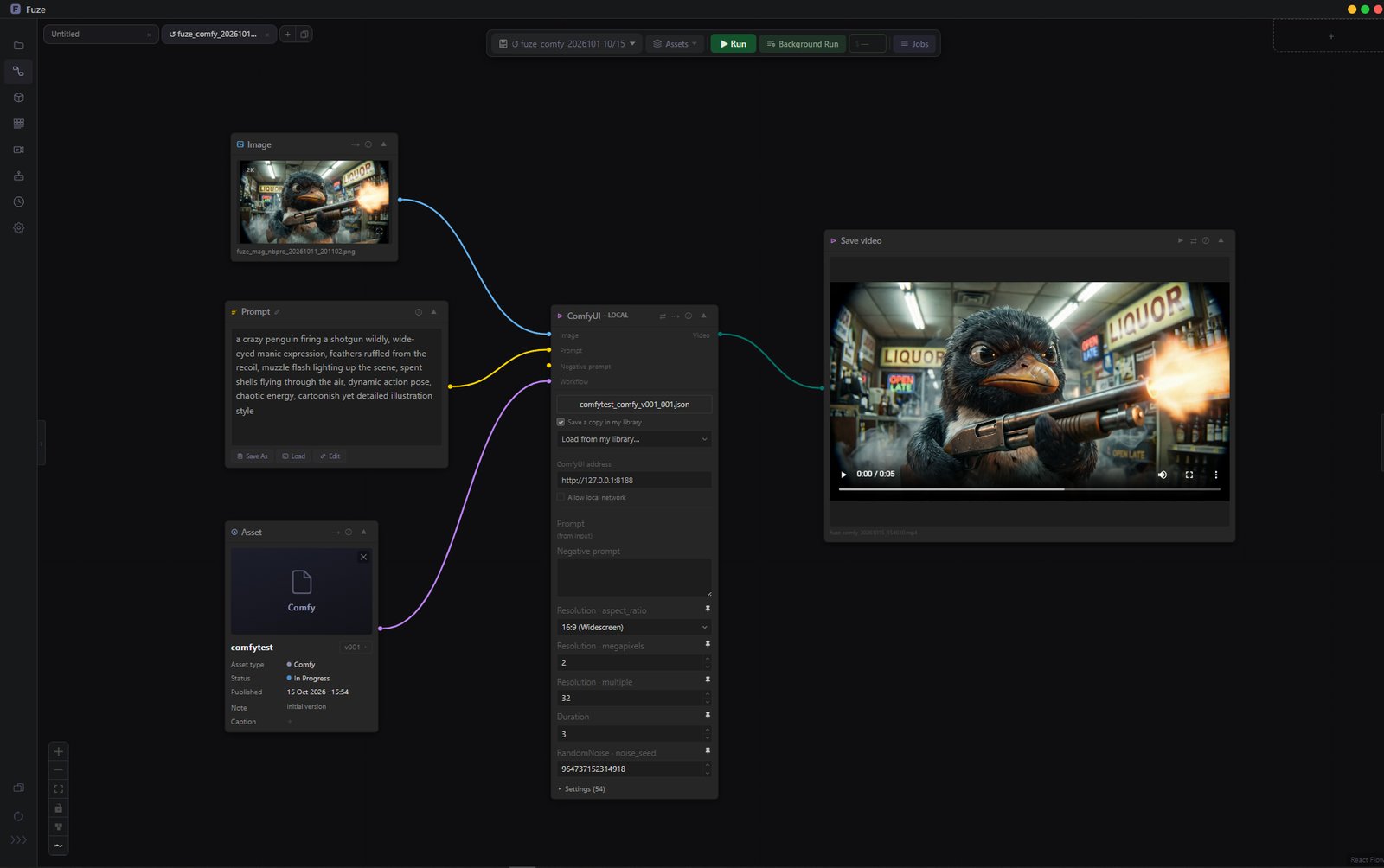
- Choose a workflow. Add the ComfyUI node and choose a workflow exported from ComfyUI with Export (API), or pick one from Load from my library. That list is the folder
Documents/Fuze/flow/comfyUI, and Save a copy in my library (on by default) copies there every file you choose. The workflow is stored inside the node, so the Flow keeps working without the original file.Elige un workflow. Añade el nodo ComfyUI y elige un workflow exportado desde ComfyUI con Export (API), o escoge uno en Load from my library. Esa lista es la carpetaDocuments/Fuze/flow/comfyUI, y Save a copy in my library (activado por defecto) copia ahí cada fichero que eliges. El workflow se guarda dentro del nodo, así que el Flow sigue funcionando sin el fichero original. - Inputs and output. The node gets one image input per Load Image node of the workflow and one text input per prompt. A connected input wins over the text typed in the node, and a prompt called negative is listed below the other prompts. The workflow needs one Save Image or Save Video node, so the output is an image or a video.Entradas y salida. El nodo tiene una entrada de imagen por cada nodo Load Image del workflow y una entrada de texto por cada prompt. Una entrada conectada gana al texto escrito en el nodo, y un prompt llamado negative aparece debajo de los demás prompts. El workflow necesita un nodo Save Image o Save Video, así que la salida es una imagen o un vídeo.
- Settings in sight. The other settings of the workflow are in the Settings list, grouped by ComfyUI node. To keep a few on top, start the title of their node in ComfyUI with
[Fuze](for example[Fuze] Duration), export the workflow again and choose it in the node. You can also pin or unpin any setting with the pin icon next to it.Ajustes a la vista. El resto de ajustes del workflow están en la lista Settings, agrupados por nodo de ComfyUI. Para tener unos pocos arriba, empieza el título de su nodo en ComfyUI con[Fuze](por ejemplo[Fuze] Duration), exporta de nuevo el workflow y elígelo en el nodo. También puedes fijar o soltar cualquier ajuste con el icono de chincheta que tiene al lado. - Workflows as assets. Register the workflow
.jsonas an asset of your own type: in Register as Asset choose + Add type and create one, for examplecomfy. Assets of your own types have their own tab in the Assets page and appear in the Asset Loader of Flow.Workflows como assets. Registra el.jsondel workflow como un asset de un tipo propio: en Register as Asset elige + Add type y crea uno, por ejemplocomfy. Los assets de tipos propios tienen su propia pestaña en la página de Assets y aparecen en el Asset Loader de Flow. - Workflow input. Load that asset in Flow (it becomes an Asset node) and connect it to the Workflow input, the last one of the ComfyUI node. The workflow loads into the node as if you had chosen the file, with its inputs and settings. If you disconnect the Asset, the node empties again (a workflow you chose by hand stays). If the asset has several versions, pick the one you want in the version selector of the Asset node and the ComfyUI node loads that version: Fuze never changes version by itself. If the connected asset has no
.jsonfile, the node says so.Entrada Workflow. Carga ese asset en Flow (se convierte en un nodo Asset) y conéctalo a la entrada Workflow, la última del nodo ComfyUI. El workflow se carga en el nodo como si hubieras elegido el fichero, con sus entradas y ajustes. Si desconectas el Asset, el nodo se vacía de nuevo (un workflow que elegiste a mano se mantiene). Si el asset tiene varias versiones, elige la que quieras en el selector de versiones del nodo Asset y el nodo ComfyUI carga esa versión: Fuze nunca cambia de versión por sí solo. Si el asset conectado no tiene un fichero.json, el nodo lo indica. - Server. The node talks to the ComfyUI at the address shown in it (by default
http://127.0.0.1:8188). Tick Allow local network to use the private-network address of another computer (192.168.x.x,10.x.x.x,172.16-31.x.x). Internet addresses are never accepted.Servidor. El nodo habla con el ComfyUI de la dirección que muestra (por defectohttp://127.0.0.1:8188). Marca Allow local network para usar la dirección de red privada de otro ordenador (192.168.x.x,10.x.x.x,172.16-31.x.x). Las direcciones de internet nunca se aceptan.