 Fuze
FuzeBridge
Custom ComfyUI nodes that send generations straight into your Fuze project. Nothing leaves your network if you work fully local.Nodos personalizados de ComfyUI que envían las generaciones directamente a tu proyecto de Fuze. Nada sale de tu red si trabajas totalmente en local.
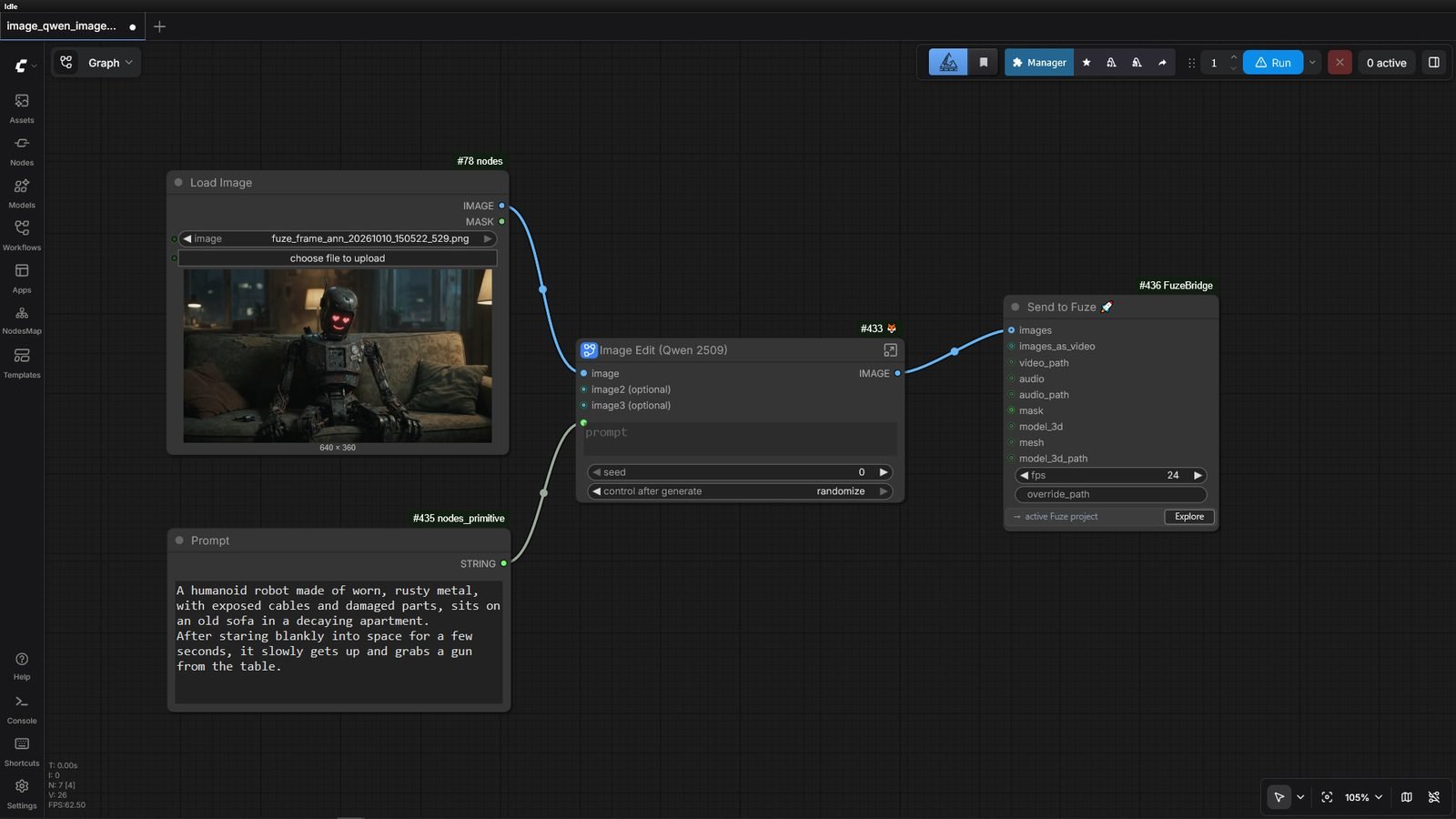
- Send to Fuze. Connect the node at the end of any ComfyUI graph. It accepts images, video, audio, masks and 3D models.Send to Fuze. Conecta el nodo al final de cualquier grafo de ComfyUI. Acepta imágenes, vídeo, audio, máscaras y modelos 3D.
- Lands in your project. The node shows the active Fuze project, and results appear in the Manager. Set the frame rate for video, or an override path to choose the destination.Llega a tu proyecto. El nodo muestra el proyecto activo de Fuze y los resultados aparecen en el Manager. Define los fps para vídeo, o una ruta alternativa para elegir el destino.
- Drag from Fuze to ComfyUI. Hold
Shiftand drag an image from the Manager onto the ComfyUI canvas to create a Load Image node. If the PNG was made in ComfyUI, ComfyUI loads the workflow stored inside it. HoldShift+Ctrl(Shift+Optionon macOS) to drag the image without that workflow and always get a Load Image node. ComfyUI copies the image into its own input folder.Arrastrar de Fuze a ComfyUI. ManténShifty arrastra una imagen del Manager al lienzo de ComfyUI para crear un nodo Load Image. Si el PNG se generó en ComfyUI, ComfyUI carga el workflow guardado dentro. ManténShift+Ctrl(Shift+Optionen macOS) para arrastrar la imagen sin ese workflow y obtener siempre un Load Image. ComfyUI copia la imagen a su propia carpeta input. - Load in Comfy. In the Metadata panel (ℹ) of a PNG generated in ComfyUI, the workflow appears as one readable line with its node count and a Load in Comfy button that opens it in a new ComfyUI tab. It needs ComfyUI open in your browser and the updated FuzeBridge nodes. Fuze looks for ComfyUI on the usual local addresses (port 8188, or 8000 in ComfyUI Desktop).Load in Comfy. En el panel Metadata (ℹ) de un PNG generado en ComfyUI, el workflow aparece en una línea legible con su número de nodos y un botón Load in Comfy que lo abre en una pestaña nueva de ComfyUI. Necesita ComfyUI abierto en el navegador y los nodos de FuzeBridge actualizados. Fuze busca ComfyUI en las direcciones locales habituales (puerto 8188, o 8000 en ComfyUI Desktop).
- Plans. Send to Fuze is available in every plan, Free included. Load in Comfy requires Indie or Studio.Planes. Send to Fuze está disponible en todos los planes, incluido Free. Load in Comfy requiere Indie o Studio.