 Fuze
MCP
Let Claude, or any other AI app that supports MCP, work with your Fuze project while Fuze is open: look at your files, organize them, register assets, build storyboards, video edits and 3D scenes, and generate images, video and audio.Deja que Claude, o cualquier otra app de IA compatible con MCP, trabaje con tu proyecto de Fuze mientras Fuze está abierto: que vea tus archivos, los organice, registre assets, monte storyboards, ediciones de vídeo y escenas 3D, y genere imágenes, vídeo y audio.
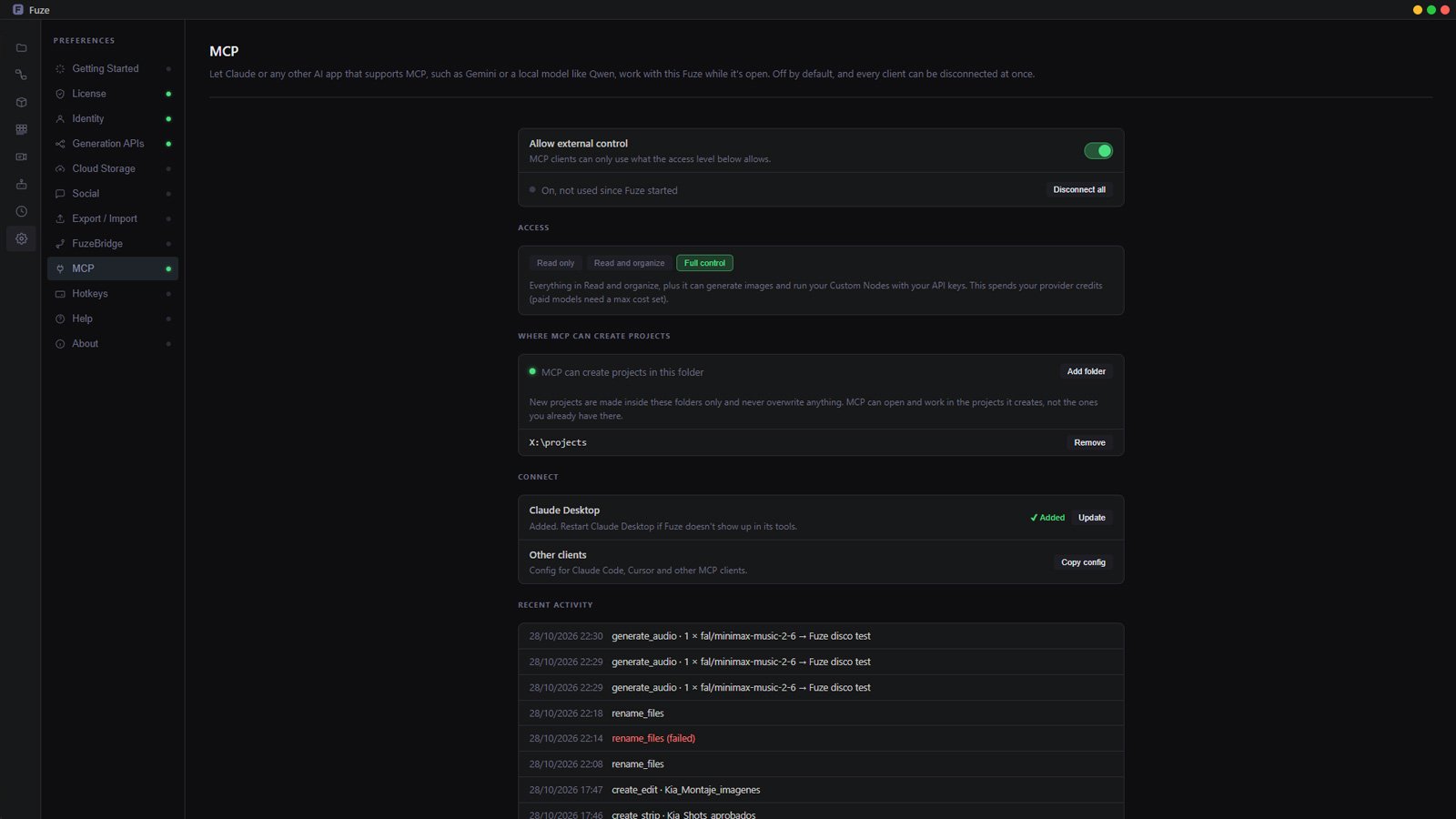
Set it upConfigurarlo
Everything is in Settings > MCP. It is off by default.Todo está en Settings > MCP. Viene apagado por defecto.
- Turn on Allow external control. While it is off, Fuze rejects every request from an MCP client.Activa Allow external control. Mientras esté apagado, Fuze rechaza todas las peticiones de un cliente MCP.
- Choose the access level (see below).Elige el nivel de acceso (mira más abajo).
- Connect your client. For Claude Desktop, press Add to Claude Desktop. Fuze adds itself to the Claude Desktop configuration and keeps a backup copy of the file next to it. For Claude Code, Cursor and other clients, press Copy config and paste it into the client's MCP settings.Conecta tu cliente. Para Claude Desktop, pulsa Add to Claude Desktop. Fuze se añade a la configuración de Claude Desktop y deja una copia de seguridad del fichero a su lado. Para Claude Code, Cursor y otros clientes, pulsa Copy config y pégala en los ajustes MCP del cliente.
- Restart the client. Close Claude Desktop completely (also from the system tray) and open it again. Fuze should appear in the tools menu of the chat. Fuze itself must be open for it to work.Reinicia el cliente. Cierra Claude Desktop del todo (también desde la bandeja del sistema) y ábrelo de nuevo. Fuze debería aparecer en el menú de herramientas del chat. Fuze tiene que estar abierto para que funcione.
Access levelsNiveles de acceso
- Read only. The client can list projects, folders, files, notes, statuses and assets, search notes, look at image thumbnails and video frames, analyze songs and clips, read your storyboards, edits and costs, see your 3D scene as images, and show things in Fuze. It changes nothing.Read only. El cliente puede listar proyectos, carpetas, archivos, notas, estados y assets, buscar en las notas, ver miniaturas de imágenes y fotogramas de vídeo, analizar canciones y clips, leer tus storyboards, ediciones y costes, ver tu escena 3D como imágenes, y mostrar cosas en Fuze. No cambia nada.
- Read and organize. Everything in Read only, plus changing file statuses, adding notes, creating, moving and renaming files and folders, deleting files and folders, creating and updating assets and their versions, building and editing storyboards, edits and 3D scenes, exporting and rendering them, and creating new projects.Read and organize. Todo lo de Read only, y además cambiar el estado de los archivos, añadir notas, crear, mover y renombrar archivos y carpetas, borrar archivos y carpetas, crear y actualizar assets y sus versiones, montar y editar storyboards, ediciones y escenas 3D, exportarlas y renderizarlas, y crear proyectos nuevos.
- Full control. Everything above, plus generating images, video and audio, and running your Custom Nodes, with your own API keys. This spends your provider credits.Full control. Todo lo anterior, y además generar imágenes, vídeo y audio, y lanzar tus Custom Nodes, con tus propias claves de API. Esto gasta créditos de tu proveedor.
What you can doQué puedes hacer
- Browse your project. Ask Claude what is in a folder, which files are approved or have notes, or to look at some images and give an opinion.Explorar tu proyecto. Pregunta a Claude qué hay en una carpeta, qué archivos están aprobados o tienen notas, o pídele que mire unas imágenes y te dé su opinión.
- Show things in Fuze. Ask for "the approved images of concept" and Fuze opens that folder in the Manager showing only those files, under a From Claude band. Clear or
Escbrings the folder back to normal.Mostrar cosas en Fuze. Pide "las imágenes aprobadas de concept" y Fuze abre esa carpeta en el Manager mostrando solo esos archivos, bajo una banda From Claude. Clear oEscdevuelve la carpeta a su estado normal. - Point at what you mean. Select files in the Manager, or open one in the Lightbox, and say "this image". Claude gets the original files. Images dragged into the chat are recompressed copies without a path, so select them in Fuze instead.Señalar lo que quieres decir. Selecciona archivos en el Manager, o abre uno en el Lightbox, y di "esta imagen". Claude recibe los archivos originales. Las imágenes arrastradas al chat son copias recomprimidas sin ruta, así que selecciónalas en Fuze.
- Search notes. Ask "what did Ana say about the lighting this week" and Claude searches the notes of a folder and its subfolders by words, author and date. It can then open a notes sheet in Fuze with those files.Buscar en las notas. Pregunta "qué dijo Ana de la iluminación esta semana" y Claude busca en las notas de una carpeta y sus subcarpetas por palabras, autor y fecha. Después puede abrir en Fuze una hoja de notas con esos archivos.
- Organize. Set statuses, approve files and add notes with your name. Register assets, add versions, choose the current version and edit names, tags and descriptions.Organizar. Cambia estados, aprueba archivos y añade notas con tu nombre. Registra assets, añade versiones, elige la versión actual y edita nombres, etiquetas y descripciones.
- Move and rename. Claude can create folders, move files and folders, and rename files, always inside the
_workfilesof the open project and never overwriting anything. Moved or renamed files keep their notes, status, approval and favorite. Renaming asks you first: Fuze shows one dialog for the whole batch (how many files and a few examples) and nothing is renamed unless you accept.Mover y renombrar. Claude puede crear carpetas, mover archivos y carpetas, y renombrar archivos, siempre dentro de_workfilesdel proyecto abierto y sin sobrescribir nada. Los archivos movidos o renombrados conservan sus notas, estado, aprobación y favorito. Renombrar te lo pregunta antes: Fuze muestra un único diálogo para todo el lote (cuántos archivos y unos ejemplos) y no se renombra nada si no aceptas. - Delete files and folders. Claude can ask to delete up to 50 files, or a folder, of the
_workfilesof the open project. Fuze shows one confirmation dialog for the whole request (how many files and the first names) and waits up to 2 minutes; if you decline or do not answer, nothing is deleted. If one path is not a valid file, the whole batch is cancelled. If you accept, everything goes to the project trash, where it stays for 72 hours, exactly as when you delete in the Manager (approval, favorite and omit marks are cleared too).Borrar archivos y carpetas. Claude puede pedir borrar hasta 50 archivos, o una carpeta, de_workfilesdel proyecto abierto. Fuze muestra un único diálogo de confirmación para toda la petición (cuántos archivos y los primeros nombres) y espera hasta 2 minutos; si rechazas o no contestas, no se borra nada. Si una ruta no es un archivo válido, se cancela todo el lote. Si aceptas, todo va a la papelera del proyecto, donde se queda 72 horas, igual que al borrar en el Manager (también se quitan las marcas de aprobado, favorito y omit). - Create projects. Claude can create an empty project, but only inside the folders you allow in Settings > MCP > New projects (none by default), and open it. It can only work on projects it created this way.Crear proyectos. Claude puede crear un proyecto vacío, pero solo dentro de las carpetas que permitas en Settings > MCP > New projects (ninguna por defecto), y abrirlo. Solo puede trabajar en los proyectos que haya creado así.
- Storyboards. Claude can build a Strip from a list of shots, show it in Fuze, and then edit it: change, add, move or remove shots. Removing a shot never deletes the image, and Fuze keeps a copy of the strip first.Storyboards. Claude puede montar un Strip desde una lista de planos, mostrarlo en Fuze y después editarlo: cambiar, añadir, mover o quitar planos. Quitar un plano nunca borra la imagen, y Fuze guarda antes una copia del strip.
- Costs. Ask how much a project has spent, by provider, model, user or day, and get a PDF report (Studio). Amounts are estimates, not invoices, and your role and license decide how much detail you see.Costes. Pregunta cuánto ha gastado un proyecto, por proveedor, modelo, usuario o día, y obtén un informe en PDF (Studio). Los importes son estimados, no facturas, y tu rol y tu licencia deciden cuánto detalle ves.
- Edit video in Editorial. Claude can listen to a song (tempo, beats, bars, drops and sections), look at your clips (duration, scene cuts, frames and the moment of most movement) and assemble an Editorial edit that cuts to the beat. It can then adjust clips, snap cuts and actions to the beats, review its own edit frame by frame, go back to a previous copy, and export to MP4 or FCPXML. If you marked a shots folder, it can also list the versions of each shot, switch a clip to another version (or make it follow the latest) and promote shots to Assets. Every change keeps a copy of the edit (the last 10), so it can always be undone.Montar vídeo en Editorial. Claude puede escuchar una canción (tempo, beats, compases, drops y secciones), mirar tus clips (duración, cortes de escena, fotogramas y el momento de más movimiento) y montar una edición de Editorial con los cortes al ritmo. Después puede ajustar clips, llevar cortes y acciones a los beats, revisar su propio montaje fotograma a fotograma, volver a una copia anterior y exportar a MP4 o FCPXML. Si marcaste una carpeta de shots, también puede listar las versiones de cada shot, cambiar un clip a otra versión (o hacer que siga la última) y promover shots a Assets. Cada cambio guarda una copia de la edición (las 10 últimas), así que siempre se puede deshacer.
- Build 3D scenes. Ask Claude to create a Scene 3D from a description, or from an image you have selected in Fuze: it places characters and props, poses them, sets the camera, and can animate the scene. It then looks at the result as images, compares it with your reference (overlaying it on the camera view), and corrects what does not match. It can also save the scene, open saved ones and render a still or a video, which land in
_imagesor_video. Scene 3D has to be available in your Fuze, and every change keeps a backup, so it can always be undone.Crear escenas 3D. Pide a Claude que cree una escena de Scene 3D a partir de una descripción, o de una imagen que tengas seleccionada en Fuze: coloca personajes y objetos, los posa, ajusta la cámara y puede animar la escena. Después mira el resultado como imágenes, lo compara con tu referencia (superponiéndola a la vista de la cámara) y corrige lo que no encaja. También puede guardar la escena, abrir las guardadas y renderizar una imagen o un vídeo, que acaban en_imageso_video. Scene 3D tiene que estar disponible en tu Fuze, y cada cambio guarda una copia, así que siempre se puede deshacer. - Generate images. Claude can generate up to 8 images per request with the models you have keys for. They are saved in your Manager output folder (the one marked with Set as output folder) or in the folder you name, and they appear as in-progress cards while they generate. Mention an asset, for example
Marta, to use its images as references and its Prompt description in the prompt, so characters stay consistent.Generar imágenes. Claude puede generar hasta 8 imágenes por petición con los modelos para los que tengas clave. Se guardan en la carpeta de output del Manager (la marcada con Set as output folder) o en la carpeta que indiques, y aparecen como tarjetas en curso mientras se generan. Menciona un asset, por ejemploMarta, para usar sus imágenes como referencia y su Prompt description en el prompt, y así mantener la coherencia de los personajes. - Generate video and audio. Up to 4 videos (Seedance and Kling, from text, first and last frame, or references) or 4 audios per request: music with lyrics, voice, or dialogues of up to 3 turns. They are saved in the
_videoor_soundfolder of the destination and appear as in-progress cards too.Generar vídeo y audio. Hasta 4 vídeos (Seedance y Kling, desde texto, primer y último fotograma, o referencias) o 4 audios por petición: música con letra, voz, o diálogos de hasta 3 turnos. Se guardan en la carpeta_videoo_sounddel destino y también aparecen como tarjetas en curso. - Run Custom Nodes. Claude can launch your own Custom Nodes (images, video, audio, 3D or text) using their parameters. Results are saved in the folder that matches their type, and text answers are returned to Claude.Lanzar Custom Nodes. Claude puede lanzar tus propios Custom Nodes (imagen, vídeo, audio, 3D o texto) con sus parámetros. Los resultados se guardan en la carpeta que corresponde a su tipo, y las respuestas de texto vuelven a Claude.
Fuze never starts a paid generation without a maximum cost. Claude gets the estimated price first and asks you before launching. This applies to images, video, audio and Custom Nodes. You can stop any item or the whole request, and cancelling also works from the card in the Manager.Fuze nunca lanza una generación de pago sin un coste máximo. Claude recibe antes el precio estimado y te pregunta antes de lanzar. Esto vale para imágenes, vídeo, audio y Custom Nodes. Puedes parar un elemento o toda la petición, y cancelar también funciona desde la tarjeta del Manager.
SafetySeguridad
- Only your projects. A client can only touch the open project and your recent projects that you have access to. In pipeline mode, only the workspace.Solo tus proyectos. Un cliente solo puede tocar el proyecto abierto y tus proyectos recientes a los que tienes acceso. En modo pipeline, solo el workspace.
- Nothing destructive without your OK. Renaming files and deleting files or folders only happen after you accept a dialog in Fuze, and anything deleted goes to the project trash for 72 hours. Moving never overwrites, and the tools that edit strips and edits keep a copy first. Moving, renaming and deleting only work inside the
_workfilesof the open project.Nada destructivo sin tu OK. Renombrar archivos y borrar archivos o carpetas solo ocurre después de que aceptes un diálogo en Fuze, y lo que se borra va a la papelera del proyecto durante 72 horas. Mover nunca sobrescribe, y las herramientas que editan strips y ediciones guardan antes una copia. Mover, renombrar y borrar solo funcionan dentro de_workfilesdel proyecto abierto. - Its own token. Clients use a token of their own, separate from the app. Disconnect all generates a new one and cuts off every connected client at once.Token propio. Los clientes usan un token propio, distinto del de la app. Disconnect all genera uno nuevo y corta a todos los clientes conectados a la vez.
- Recent activity. Everything an MCP client changes or generates is listed at the bottom of the MCP page, with date and time.Actividad reciente. Todo lo que un cliente MCP cambia o genera aparece al final de la página MCP, con fecha y hora.